
Desks Reviewed: How to Choose the Perfect Workstation for Your Home Office
Posted by Admin on
You’ve probably spent hours scrolling through Pinterest, hunting for that one desk that feels like it was carved just for your living room.
It’s not just about the surface; it’s the way a well‑chosen desk can turn a dull space into a statement of style and comfort.
Have you ever walked into a room and felt an instant lift, knowing every piece was meant to coexist?
That’s the magic we bring with our curated selection of luxury desks – from the sleek, minimalist Nordic design to the warm, hand‑painted statement pieces.
At Harvey Bruce Interiors, we’ve seen how the right desk can anchor a room’s narrative, turning everyday tasks into moments of indulgence.
Think about the last time you settled in for a long work session. Did the desk make you feel grounded, or did it feel like an afterthought?
We’ve found that a thoughtfully chosen surface not only supports productivity but also whispers stories of craftsmanship and heritage.
If you’re a homeowner looking to elevate your space, the desk you pick is your silent partner in design.
But how do you decide between a sleek modern piece and a rustic artisan masterpiece?
Let’s start by unpacking what makes a desk more than just a piece of furniture.
First, look at the material: oak, walnut, or engineered wood – each carries its own breath and character.
Next, consider the ergonomics: the height, the depth, the drawer layout—all dictate how comfortable you’ll feel.
Finally, think about the story it tells: a hand‑painted finish might hint at a family’s love for tradition, while a clean glass top signals modernity.
By keeping these three pillars in mind, you’ll spot a desk that feels right, not just looks good.
So, ready to transform your home with a desk that speaks volumes?
Let’s dive in and discover how the perfect desk can elevate every corner of your life.
TL;DR
Finding the right desk feels like choosing a new family member—it should comfort, inspire, and tell a story. A solid oak piece offers warmth, a glass top signals sleek modernity, and the right ergonomics keeps you productive all day. Pick one that feels like home and for every room.
Step 1: Assess Your Workspace Needs
Before you even start scrolling through product listings, pause and ask yourself: what is the real purpose of this desk in the day‑to‑day life of the people who’ll be using it?
It’s easy to get swept up in the gleam of a new surface, but the best desks solve a problem before it even shows up. Think about the tasks you’ll do—typing, sketching, video calls, or maybe a mix of all three.
Define the Function First
Make a quick list: "I need a sturdy place for my laptop and a spare spot for notes," or "I want a visual anchor for my morning coffee ritual." The list will become the compass that keeps you from buying a desk that feels like a decorative throwaway.
Once you have that list, group the items into must‑have, nice‑to‑have, and optional. The “must‑have” items dictate the size and layout. For example, a writer who uses a tablet may need a larger surface than someone who only keeps a notebook and a mug.
Measure Your Space
Grab a tape measure and run it across the room—walls, windows, doorways. Note the length of the wall that can accommodate a desk, the height of the ceiling, and the placement of power outlets or USB hubs.
Mark the dimensions with masking tape or a piece of chalk. Remember, the desk is not just a surface; it’s a frame that needs room to breathe. If you’re unsure, sketch a quick floor plan and play around with the desk size in your mind.
Now ask yourself: will this desk fit comfortably without crowding the room, or will it feel like a tight squeeze?
Consider the Lifestyle of the Room
If the desk will double as a guest table or a spot for kids to do homework, look for a piece that balances style with durability. A lightweight, modular design can move around more easily, while a robust, solid oak desk can stand up to frequent use.
Do you have a lot of natural light? A glass top reflects it, giving a brighter feel, while a dark wood absorbs light and feels cosy. Think of the ambience you want to create.
Does the room already have a particular style? A Nordic writing desk can bring a minimalistic touch, whereas a hand‑painted piece can act as a conversation starter in a classic setting.
Ergonomics Matters
Height is more important than you think. A desk that’s too low can strain your neck, while a desk that’s too high can make typing uncomfortable. Aim for a height where your elbows sit at a 90‑degree angle when you’re seated.
Depth also affects comfort. A surface that’s too shallow forces you to lean in, and a deep one can create a “desk island” feel that isolates the work area. Aim for at least 28 inches of depth for a balanced work zone.
Don’t forget about storage—drawers, shelves, or cable management can keep the surface clutter‑free. A desk with built‑in storage feels more integrated than one that relies on separate organizers.
That short video gives you a quick visual tour of how a desk can fit into a modern living space. Take note of the way light plays on the surface and how the surrounding furniture complements the piece.

Once you’ve mapped out function, space, style, and ergonomics, you’re ready to start comparing actual desks. Keep the list you made handy—every feature should either be a must or a nice‑to, never a wish‑fulfillment.
Remember: the right desk feels like an extension of your day, not an afterthought. When you know what you truly need, finding the perfect fit becomes a joy rather than a chore.
Step 2: Explore Desk Materials and Finishes
Choose the right grain
When you’re picking a desk, start with the grain. A smooth, straight grain feels like a soft pillow for your fingertips; a wavy or twisted grain adds drama and can become a conversation starter.
Imagine a couple that loves a subtle, contemporary vibe: a light‑finished pine or maple will keep the space airy and match a white wall. For those who lean toward rustic charm, a rich oak or walnut with a darker stain will ground the room and bring warmth.
Tip: Hold a sample board under natural light. The way it reflects light will tell you whether you’re leaning toward a glossy sheen or a matte finish.
Engineered wood vs solid hardwood
Solid hardwood feels like a legacy piece you can pass down. It’s dense, resilient, and often comes with a natural finish that highlights the wood’s character.
Engineered options, like particleboard or MDF with a veneer, are cost‑effective and more dimensionally stable, which helps when you’re moving the desk around or dealing with humidity swings.
Action step: Ask the showroom for a cross‑section sample. If it shows a consistent layer structure, you’re probably looking at engineered wood. If you see a single grain across the whole thickness, that’s solid hardwood.
The finish game: varnish, oil, and lacquer
Varnish gives a hard, glossy shell that protects against spills—great for a home office that doubles as a coffee station.
Oil finishes soak into the grain, enhancing its natural tones and creating a softer feel; they’re perfect for a desk that’s a centerpiece in a living room.
Lacquer offers a satin or matte look and is quick‑dry, but it can be less forgiving if you need to buff scratches.
Ask the consultant to show you how each finish looks after a week of use. A real‑life test can reveal differences you’ll never see in a showroom photo.
Sustainability matters
Look for FSC‑certified wood or reclaimed timber. These options reduce environmental impact and often come with a story that can add personality to your space.
Reclaimed oak, for instance, brings character in the form of knots and weathered edges, while still offering the durability of a modern desk.
Step: Request a provenance certificate from the retailer. This document can reassure you that the wood has a verified supply chain.
Texture and color play
If you’re living in a bright, airy loft, a light finish that reflects sunlight will keep the room from feeling cramped.
Conversely, a darker, matte finish can create a cozy, intimate feel in a smaller bedroom‑office, especially if paired with warm lighting.
Pro tip: Bring a paint swatch or fabric sample next to your desk in the actual room. Lighting changes throughout the day will shift the perceived color, so test it at dawn and dusk.
Practical maintenance checklist
Decide whether you’re willing to oil or wax regularly. Oiled surfaces need touch‑ups every 3–6 months, while a sealed varnish can last years with minimal care.
Check if the finish is resistant to common stains—coffee, wine, or a child’s marker. Some finishes come with a quick‑clean wipe that can be lifesavers during busy mornings.
Final action: Schedule a yearly cleaning routine. A simple dusting and a microfiber wipe with a mild cleaner will keep the surface looking brand new.
Climate can be a silent saboteur. In a humid kitchen or a damp basement, wood expands and contracts. Choosing a finish that seals moisture, such as a high‑gloss lacquer, can protect against warping.
Material Testing: Grab a small coffee mug and place it on the desk after a day of use. If the surface stays clean and the mug’s rim doesn’t show scratches, the finish is holding up well.
Layered Finishes: If you’re a design enthusiast, consider applying a clear topcoat over a natural oil. The result is a subtle sheen that still lets the grain breathe.
Now you’re armed to make the material choice that feels like home, not just a piece of furniture. By focusing on grain, wood type, finish, and sustainability, you’ll end up with a desk that not only supports your work but also tells your story.
Step 3: Compare Popular Desk Types
Why the comparison matters
After you’ve pinned down what you’ll be doing and how big the room is, the next step is to look at the desk itself. You’ve seen a few styles, but the real question is: which type will keep you comfortable and productive all day? That’s what we’ll break down now.
1. Traditional Fixed‑Height Desks
These are the classic “sit‑only” workstations you’ll find in home offices, study rooms, or even living‑room desk corners.
What’s great? A solid, stable surface that won’t wobble when you’re typing or pulling up a stack of files. Many come with built‑in drawers or a shallow shelf that keeps your phone, pens, and notepad in reach.
Drawback? If you’re someone who’s constantly scrolling through emails or needs to move between a laptop and a large monitor, a fixed height can feel restrictive. You’ll have to rely on your chair for every ergonomic tweak.
Real‑world example
Meet Emma, a freelance designer in a 10‑ft square loft. She chose a walnut executive desk that sits at the standard 29‑inch height. With a comfortable chair and a small monitor arm, she stays relaxed for long drawing sessions. The key? The desk’s depth of 32 inches gives her plenty of space for a sketchpad and a coffee mug.
2. Electric Height‑Adjustable Desks
These are the sleek, motor‑powered workstations that let you raise or lower the surface with a button.
Why people love them? You can stand for a few minutes to stretch or sit for the rest of the day, all without moving furniture. They’re also great for people with back pain or who need to shift between a laptop and a monitor.
Heads‑up: the initial cost is higher, and the desk needs a power outlet within reach. Some models have memory presets, so you can quickly switch to your preferred height.
Real‑world example
Consider James, a software engineer who works from a studio apartment. He installed an electric sit‑stand desk that goes from 27 to 48 inches. With a small footprint and a built‑in cable tray, he’s able to set up a dual‑monitor rig while still having a standing option for quick check‑ins.
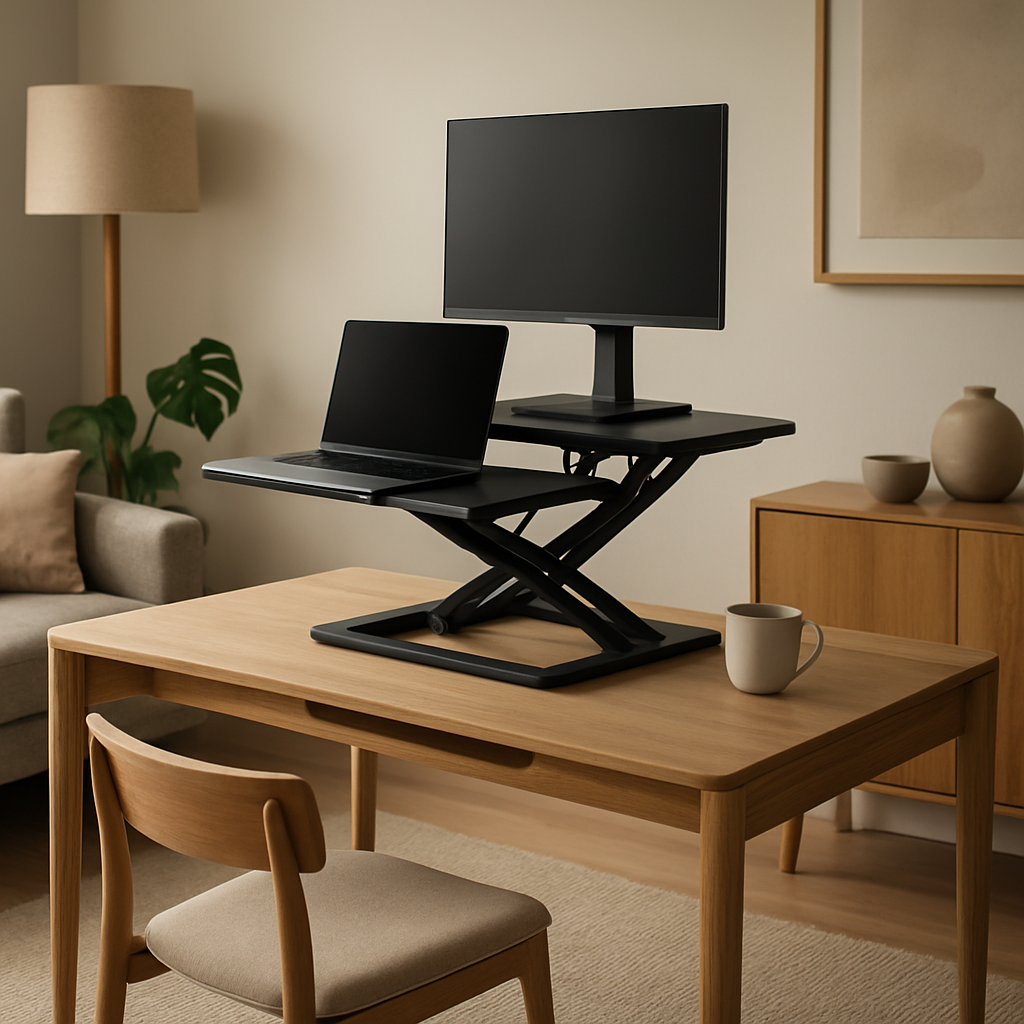
3. Desk Converters (Standing‑Desk Add‑Ons)
Converters sit on top of an existing desk and give you a raised platform to stand on.
They’re the budget‑friendly choice if you’re not ready to replace the whole desk. They’re also a good fit for tight spaces because you can keep the original desk’s depth and storage.
However, they add a bit of height to your setup, and you’ll need to balance the extra load on the original desk.
Real‑world example
Aisha, a small‑business owner, had a pre‑existing oak writing desk but wanted the benefits of a sit‑stand setup. She chose a lightweight converter that fits under the desk’s edge. The result is a clean, ergonomic workstation without buying a new piece of furniture.
Key Decision Factors
Which type is right for you depends on a few simple questions: How much space do you have? What’s your budget? Do you need to move between sitting and standing frequently? And lastly, do you need built‑in storage or prefer a minimal look?
Quick Comparison Table
| Desk Type | Key Feature | Ideal For |
|---|---|---|
| Traditional Fixed‑Height | Stable surface, built‑in storage | Long, focused work; small budgets |
| Electric Height‑Adjustable | Full sit‑stand range, memory presets | Health‑focused users; high‑end budgets |
| Desk Converter | Add‑on, minimal footprint | Existing desks; tight spaces |
Actionable Checklist
1. Measure the width of the wall where the desk will sit.
2. Note the available power outlets for an electric desk.
3. Decide if you need drawers or a shallow shelf.
4. Sketch a quick floor plan and overlay the desk’s footprint.
5. Test a standing‑desk height if you can in a showroom or with a temporary setup.
6. Budget for the desk plus any necessary accessories (monitor arm, anti‑fatigue mat, cable management).
Final thought
At the end of the day, it’s all about how the desk feels when you sit down or stand up. Take the time to try out each type—most showrooms let you play with the height, and you can even borrow a converter for a test run. Once you know which feels right, the rest of the design will fall into place.
Step 4: Evaluate Ergonomic Features and Adjustability
When you’re in the showroom or scrolling through photos, it’s easy to fall for the sleek finish or the bold silhouette. But if the desk is going to be your daily companion, ergonomics should be the first thing you test. Think of it as a handshake—if it feels off the first time, you’re bound to notice it every day.
Start with the height. A good rule of thumb is to have your elbows at a 90‑degree angle while your forearms hang naturally. If the desk sits too low, you’ll end up hunched; too high, and you’ll be reaching like a cat on a ledge. In practice, measure your current chair’s seat height, add about 12 inches, and that’s your target desk height. For electric models, look for a smooth lift range that covers at least that span.
Depth matters just as much. A 28‑inch minimum gives you room to spread a notebook, keep a mug, and still feel unconfined. Too shallow and you’ll have to lean forward, which over time can strain the lower back. If you’re using a dual‑monitor set‑up, you’ll want a deeper surface to avoid having your screen stick out past the desk edge.
Adjustability: Why it Matters
Standing desks are more than a trendy perk. They’re a health tool. Research shows that alternating between sitting and standing can reduce back pain and improve circulation. If you have a standing‑desk conversion, test the weight limit and the ease of transition. A quick lift test—place a 10‑kg book on the platform, raise it, and see if the legs wobble—reveals whether the mechanism is robust.
Memory presets on electric desks are handy if you switch roles often. Some models let you store a sitting height and a standing height. Try pressing the preset button a couple of times while you’re in the room to gauge responsiveness. If the desk snaps back too quickly, it might be too powerful for a delicate surface finish.
Real‑World Scenario: The Home Studio
Lisa runs a freelance photography business from a loft. She needs a desk that can handle a large monitor, a laptop, and a stack of editing supplies. She chose an electric height‑adjustable desk that offers a 27‑to‑48‑inch range and a built‑in cable tray. When she tested it, the desk held a 15‑kg monitor without wobble, and the memory presets let her switch between a relaxed sit‑stand rhythm and a focused editing mode in under 10 seconds. That little switch keeps her energy high and her back from screaming after an all‑night shoot.
Now, think about your own space. Do you often find yourself reaching for a phone or a coffee mug? If so, look for desks that offer recessed cable management or an open slot design. An open‑slot Nordic desk, for example, keeps cords out of sight while giving you extra drawer space. Open Slot Nordic Writing Desk is a favorite for people who want a clean line and functional storage.
Another key feature is leg clearance. A desk with a narrow base can look elegant but may make it hard to stand close enough for a natural posture. Look for a four‑leg design that keeps the lower edge at least 12 inches from the floor for easy leg movement.
When you’re deciding, create a quick checklist: Height accuracy, depth adequacy, weight support, cable management, leg clearance, and memory presets. Tick each item in the showroom, then imagine a day of use. If the desk feels solid in the moment, it’s likely to stay solid for years.
Finally, remember that ergonomics isn’t a one‑size‑fits‑all. Your body changes with seasons, projects, and even mood. The best desk adapts to those shifts. If you can, borrow a converter or test a standing desk at a showroom for a full week before committing.
To wrap up, the ergonomics of a desk can be the difference between a productive day and a painful one. Pay attention to the small details—height, depth, adjustability, and storage. Trust your senses, test each feature, and when you find the one that feels right, you’ll have a partner that supports both your work and your wellbeing.
For more insights on staying focused while you work, see How to Improve Focus: Practical Steps for Better Concentration.
Step 5: Incorporate Customization and Accessories
Now that you’ve locked in the shape, size, and feel of your desk, the next layer is what makes it truly yours: the bits that adapt to your workflow and style.
Think of customization as the personal chef of furniture—every garnish matters. Accessories like monitor arms, keyboard trays, and cable sleeves can turn a plain surface into a command centre that actually works for you.
First up: height‑adjustment tweaks. If you already have an electric desk, adding a small lift platform can give you a more ergonomic standing position without a full remodel. A simple, budget‑friendly option is a fold‑out standing plate that sits on top of a fixed desk. It’s easy to set up and can be swapped out whenever you’re ready for a change.
Do you juggle a laptop, a tablet, and a thick planner? A custom solid‑wood computer desk from Parkman Woodworks can be moulded to fit your exact dimensions, giving you dedicated space for each gadget.
Next, the accessory lineup. A monitor arm frees up the tabletop, letting you position your screen at eye level and avoid neck strain. When picking an arm, look for a 360‑degree swivel and a weight capacity that matches your display. Some arms even come with a built‑in cable clamp to keep cords tidy.
Keyboard trays are another game‑changer. If you type for hours, a sliding tray keeps the keyboard at the right height and frees the desk from being a cluttered mess. The trick is to choose a tray that’s flush with the surface when closed, so you don’t have to duck over a bulkier block every day.
Don’t forget about cable management. A simple cable sleeve or a grommet hole can transform a tangle of wires into a neat line that looks like part of the design. When you’re choosing a cable sleeve, consider materials that are flexible yet durable—silicone or braided nylon work well.
And what about storage? A slim, vertical drawer unit that slides out from the desk can keep your pens, post‑its, and gadgets within arm’s reach. If you’re working on a budget, a DIY pegboard on the wall opposite the desk can hold small tools and décor, saving precious surface area.
Now, let’s talk about personal branding. If your desk is the centrepiece of a client‑facing room, adding subtle touches—like a monogrammed leather mouse pad or a set of hand‑painted coasters—can reinforce your brand identity without shouting. These small details can turn a functional space into a statement of style.
When you’re finalising accessories, follow this quick checklist:
- Measure the distance from your eye level to the top of the screen—aim for 0 to 2 inches below the brow line.
- Verify the weight of your monitor and choose an arm that can handle it with a margin.
- Check the desk’s surface thickness—some arms clamp to a minimum 1‑inch depth.
- Inspect cable entry points and pick sleeves that fit snugly without squeezing the cords.
- Consider a desk‑side storage unit that’s no more than 12 inches deep to keep your workspace uncluttered.
Imagine a week on the new setup. You wake up, slide the keyboard out, pop the monitor into place, and the cords slide neatly into their sleeves. You’re standing for a quick stretch, your screen at eye level, and everything feels just right. That’s the sweet spot where productivity meets comfort.
Finally, remember that accessories evolve. What feels essential today might be optional next year. Keep an eye on how your workflow changes, and swap out or upgrade components as needed. By treating your desk like a living workspace, you’ll keep it fresh, functional, and a joy to use every day.
Step 6: Maintain and Upgrade Your Desk Over Time
So you’ve finally settled into that new desk, the way it feels just right when you slide the keyboard out and the monitor sits at eye level. That comfort, though, is only as good as the care you give it. Think of your desk as a living thing that thrives on routine and a little love every day.
Daily TLC: A Quick Cleaning Routine
Start with the basics: dusting and wiping. A microfiber cloth once a week removes the invisible grit that gets trapped in the corners of a surface. For stubborn marks—yes, even coffee rings—use a gentle wood‑friendly cleaner. The goal is to keep the finish shining without stripping it.
Do you know the trick that makes a surface feel fresh? A quick wipe after every session. It keeps the surface free from oils that accumulate from hands and mouse. Trust me, a clean desk feels like a fresh start each morning.
Check the Foundations: Legs and Hinges
Every few months, give your desk legs a once-over. Tighten loose screws, and if you notice wobble, add a rubber pad under the leg to steady it. Hinges on drawers can get sticky; a light coat of machine oil keeps the sliding smooth. The small adjustments you make now save you from bigger headaches later.
Ever had a drawer that just refuses to stay closed? A quick silicone spray on the tracks usually restores the glide. If the drawer’s weight feels uneven, redistribute items or use a tray to level the load.
Keep the Cords in Check
Cables are the unsung villains of a desk. If you’ve added an extra monitor or a charging station, make sure your cable management system isn’t overloaded. Replace any frayed strands and consider a new cable sleeve if the current one shows wear.
Think about a future tech upgrade: a newer monitor might be heavier or require a different power cable. Plan ahead by keeping a small toolbox with extension cords, surge protectors, and a multi‑port USB hub.
When to Upgrade: Parts and Accessories
Desks don’t stay static forever. As your workflow changes—maybe you’re adding a tablet or a new speaker system—you’ll notice your desk’s layout needs tweaking. Instead of buying a whole new piece, swap out the accessories that matter most.
Example: You’ve started using a large drawing tablet that didn’t fit in the original gap. Installing a new keyboard tray or a floating shelf can reclaim space without a full redesign. Similarly, a new ergonomic chair may require a different height; a small lift platform can bridge that gap without moving the whole desk.
Sustainability: Let Your Desk Age Gracefully
One of Harvey Bruce’s commitments is to sustainable solutions. When you care for a wooden desk properly, it can outlast generations. Avoid harsh chemicals that strip natural oils; instead, use a light olive oil polish every six months. That keeps the grain alive and the finish resilient.
When the time comes to replace a worn panel, look for reclaimed wood or FSC‑certified options. It’s a nod to the planet and a way to keep your space feeling fresh.
Periodic Big‑Picture Check
Every six months, sit at your desk and ask yourself: Does it still serve my needs? Do I feel cramped, or is the surface too flat? If the answer is yes, it’s a cue to make a small upgrade. Maybe a new monitor arm, a larger keyboard, or a better cable management sleeve.
Also, check the hardware: Are the screws still tight? Do the drawers glide? If not, a quick set of replacement screws or a small lubricant can restore the original feel.
Actionable Maintenance Checklist
- Weekly: Dust, wipe, and inspect for loose screws.
- Monthly: Lubricate drawer tracks, tighten leg bolts.
- Quarterly: Test cable integrity, update cable sleeves.
- Bi‑annual: Review ergonomics—height, depth, and accessory fit.
- Annual: Consider a fresh polish or a small upgrade (new arm, shelf).
By treating your desk like a partner that grows with you, you keep the space alive, functional, and a joy to use every day.
FAQ
What should I look for when choosing a desk that feels luxurious but still works for my daily routine?
Think of the desk as a stage for your day. A thick, polished oak surface or a hand‑painted finish gives that luxury vibe, but you also need a depth of at least 28 inches so you can spread your laptop, a notebook, and a mug without feeling cramped. Check that the legs clear at least 12 inches so you can sit or stand comfortably. A desk that balances visual appeal with usable space will keep you looking good and staying productive.
How do I keep my desk looking pristine without spending hours cleaning it?
Set a quick 5‑minute ritual: a quick wipe with a damp cloth after each session, then a dust‑free micro‑fibre wipe once a week. For oil‑finished surfaces, a light olive oil polish every six months adds shine without a fuss. Avoid harsh chemicals that strip natural oils. With this routine, your desk will stay showroom‑ready while you focus on your projects.
Is a fixed‑height desk really that limiting if I want to stand sometimes?
Not necessarily, but it can feel restrictive. A fixed desk means you rely on your chair to adjust ergonomics. If you want a true sit‑stand experience, consider a convertible or electric option. If budget or space is tight, a lightweight stand‑on converter can give you the flexibility you need without a full overhaul.
What kind of finish is best for a kitchen‑style office where I might spill coffee or wine?
A high‑gloss lacquer or a sealed varnish offers a hard, spill‑resistant shell that’s easy to wipe down. Oil finishes are softer and can show scratches; they’re great for a relaxed living‑room vibe but less forgiving for the kitchen‑style chaos. Test a small sample under your lighting to see how it behaves over time before committing.
Can I customise my desk to fit a very small room without it looking crowded?
Absolutely. Look for a narrow‑base design that keeps the lower edge at least 12 inches from the floor, giving you clearance to move. Add slim vertical drawer units or a wall‑mounted pegboard to keep essentials off the surface. These tweaks maintain a clean aesthetic while expanding functional space.
How do I decide between solid hardwood and engineered wood for a long‑lasting desk?
Solid hardwood feels like a legacy piece—it’s dense, resilient, and often comes with a natural finish that ages beautifully. Engineered wood is more dimensionally stable and can be cost‑effective, especially if you plan to move the desk or expect humidity swings. If you value a timeless look and can invest a bit more, go solid. If you want budget‑friendly durability, engineered is a solid choice.
Conclusion
We’ve walked through every angle of choosing a desk—style, size, finish, and the little details that turn a surface into a sanctuary.
So what does that mean for you? It’s simple: pick a piece that feels like an extension of your daily rhythm, not a chore. If you love the idea of a hand‑painted surface, the Hand Painted Writing Desk in our collection can make the room feel alive and personal.
Remember, sustainability matters. Opting for FSC‑certified or reclaimed wood not only keeps the planet happy but adds a story to your space. A desk that tells a quiet history can be a conversation starter at dinner parties.
Now, what’s the next step? Measure, test, and trust your senses. Stand beside the desk, reach for your laptop, and check that depth feels just right. If it feels good, that’s the sign you’ve found the right fit.
We’re here to help you fine‑tune that choice. Drop us a line if you need guidance on finishes or accessories—our family‑run team loves turning a plain table into a piece of art.
And when you finally sit down, take a moment to notice how the light dances on the grain— that little detail can turn a workday into a moment of calm.
← Older Post Newer Post →